Demo
What a Virtual Front Desk Check-In Looks Like: A Back 2 Normal Demonstration
Physical therapist Lisa Chase walks a patient through the HiBridge virtual front desk step by step, showing how simple check-in is, and reassuring patients that real people, and the in-person team, are still here.

Key takeaways
- The virtual front desk adds efficiency and access without removing the in-person team, existing staff are staying.
- Check-in is two taps: confirm you have an appointment, then whether it is your first visit or a follow-up.
- Virtual receptionists are real people, not AI, who help with check-in, booking follow-ups, and questions.
A practice introduces its virtual front desk
When Back 2 Normal Physical Therapy added a virtual front desk, physical therapist Lisa Chase did something simple and smart: she walked patients through it on camera. Her first message was reassurance, the familiar in-person team is not going anywhere; the goal is more efficiency and better access for patients.
The practice introduced the system as HiBridge, formerly Virtual Sally, and framed the new virtual receptionists as additional team members rather than replacements.
Check-in, step by step
The demonstration shows how little a patient has to do. At the screen, the first prompt asks whether you have an appointment today; you tap yes. The next asks whether it is your first appointment or initial evaluation, or a routine follow-up; you tap the answer that fits.
A short message then appears, letting you know you are being connected to your receptionist. From there, a live person picks up, no keyboard, no mouse, no app to download.
Real people, not AI
Lisa is explicit on the point patients care about most: the virtual receptionists are real people, not automated bots. They check patients in, book follow-up appointments, and answer questions, just like a receptionist standing at the desk.
The takeaway for any practice weighing the change is that a virtual front desk can feel like a warm welcome rather than a self-service machine, several new faces to greet, still human.
Full video transcript
This transcript is provided so the conversation can be searched, referenced, and read without playing the video. Minor punctuation has been added for readability.
Read the complete transcript
[00:00] Lisa Chase: Hey, everyone. I have a little surprise for you. Come on in. I want to show you something new we're adding at Back 2 Normal. We are advancing in technology, and today we are introducing Virtual Sally. Now, don't you get scared. Cameron and Jen are not going anywhere, but we want to create more efficiencies and better access for you. We are going to show you all about Virtual Sally, so stay tuned.
[00:30] Virtual receptionist: Hi, Lisa. Good morning.Lisa Chase: Good morning. Jenny, why don't you head on over and check in on our Virtual Sally? You will see the screen and the prompt, “Do you have an appointment today?” You will select yes. You will now see, “Is today your first appointment/initial evaluation?” If this is your first appointment, you will select yes. If this is a routine appointment/follow-up, you will select no.
[01:00] Lisa Chase: The next screen you will see says, “Thank you. Please wait while we connect you to your receptionist.” This is going to be your Virtual Sally representative. Virtual Sally employees are real-life people. They are not AI. They are able to assist you with checking in for your appointment, booking follow-up appointments, and answering any questions you may have. There will be several new faces through Virtual Sally, so please give a warm and enthusiastic welcome to our new team members here at Back 2 Normal.
See the virtual check-in for yourself
Book a HiBridge demonstration to walk through the patient check-in exactly as your visitors would, from the first tap to a real receptionist live on screen.
Or model your own numbers with the staffing and savings calculator.
Book a demoRelated
More from the HiBridge library
 Case Study
How Rose City Physical Therapy Reduced Its Front Desk Staffing Budget by About 50%
A 30-year Portland practice solved a staffing shortage with a live virtual receptionist, cutting front-end staffing costs while keeping check-in personal.
Read →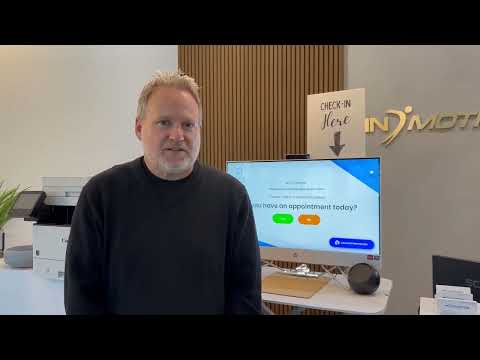 Case Study
Why In Motion OC Chose a Virtual Front Desk for Physical Therapy
An Orange County practice moved to a remote-staffed virtual front desk for lower overhead and a more modern patient experience.
Read → Patient Story
A Simple Virtual Patient Check-In Experience: Tim Bibee’s Story
A first-time, self-described non-tech-savvy patient on why a guided, live virtual check-in felt easy and personal.
Read →